Section Insights
Introduction to Learning Programming with Kids
How can programming be made engaging for children?
The speaker discusses their experience of teaching programming concepts to children through game development. They emphasize the importance of making learning engaging and digestible, especially for younger audiences.
- Engaging learning experiences are crucial for teaching programming.
- Using games can help illustrate programming concepts, but they must be digestible.
- Children may struggle to understand complex programming ideas without proper guidance.
Visual Learning Tools in Game Development
What tools can help explain game mechanics to learners?
The speaker introduces a visual book that explains game mechanics, such as how the world fills up and how enemies behave. This interactive approach helps learners grasp complex concepts.
- Visual aids can enhance understanding of game mechanics.
- Interactive explanations allow learners to engage with the material actively.
- Understanding enemy behavior is crucial for game design.
Understanding Enemy Strength in Games
How is enemy strength determined in the game?
The speaker explains that enemy strength is influenced by factors such as game depth and player level. They demonstrate how to find the relevant code that governs these mechanics.
- Enemy strength can vary based on game progression.
- Understanding the code behind game mechanics is essential for game development.
- Interactive tools can help visualize enemy behavior in real-time.
Learning Through Interactive Documentation
How can interactive documentation enhance learning?
The speaker describes a system where game code is linked to documentation that updates as changes are made. This helps learners understand the code at a deeper level and provides context for their learning.
- Interactive documentation can clarify complex code concepts.
- Real-time updates to documentation enhance the learning experience.
- Effective teaching tools can bridge the gap between theory and practice.
Quizzing for Understanding
How can quizzes reinforce learning in programming?
The speaker highlights the use of quizzes to test understanding of game mechanics. This method encourages learners to reflect on their knowledge and solidify their understanding of programming concepts.
- Quizzes can effectively assess understanding of programming concepts.
- Active engagement through quizzes promotes deeper learning.
- Teaching methods should include assessment to reinforce knowledge.
Transcript
0:01 Hello. I want to show you something what I found is quite interesting. And I'm not here to show you a game, but I did build a game with the kids. What I want to show you is some of the other things that we did alongside. because I do think they're actually quite interesting and maybe they give you some ideas of of of how you could run your own projects. So, I was thinking a little bit of like how do I get my kids to understand programming?
0:30 And obviously there's a question to which degree is this necessary, but I do think it's useful to learn. And learning should be engaging. And so if you use an agent to build games, then there's really not a lot of programming actually happening. you're basically watch code fly by and that's it, right? We built this almost entirely with with I mean like 100% with with Pi and we used a little bit of Blender MCP. and that is just generally not an experience where you necessarily learn a lot. So, I was trying to explain them like how we're going to use the different world generator algorithms and and and and what we want to how it just generally works, but it it is actually very hard for for for like an eight and an an 11-year-old to to really understand what's going on.
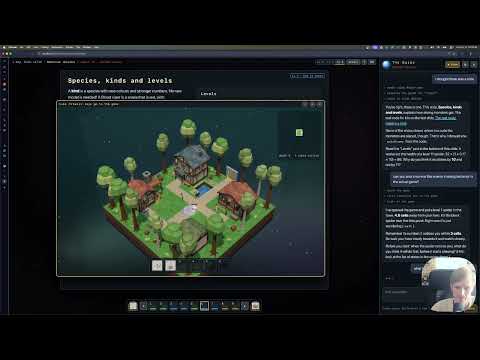
1:20 And so, we built this. And then I realized that well, I need to really invest a little bit of time into making it digestible of what's going on. And so, I will just quickly demonstrate to you roughly what it looks like. So, the world generator here, right? works like this. we have these cutouts when we move underneath one of those floors.
1:50 And yeah, that's basically it. There are enemies. They can drop items. You can fight them and so forth. All right. So, now to the more interesting part. We built this book, and this book is really an interactive guide that teaches you pretty much everything that's in this game. So, it starts with just a basic introduction, right? It's like a program is a list of instructions that a computer follows. a game is a special kind of program that does three things over and over: listen, think, and draw.
2:22 And it shows you where the pieces of code are. it explains that in this game we have a world made of cubes that are 16 by 16 squares. and roughly this is what it is, right? And then it shows you how it fits together, so it gives you a list of the files. and so forth. But, it runs the actual It runs the actual code that we have here in the game. So, we cannot just reference the code, we can also run it.
2:51 so, for instance, if we go and look at building the world, on the second page here, we can see that this here is in fact for seed 1 2 3 what you would get for the first layer, right? And this is what it looks like, and then if you were to lay us down, this is what this looks like. So, it you can read this through, and you can watch it explain, for instance, like how the world fills up, and so forth.
3:23 and like it's actually I think it's quite visual even in the form that it is right now. then you also can see here, for instance, how the monsters work. So, so this is actually the wrong part. I want to show the other one on the monsters, which is monster brains, right? So, this explains a little bit what the profile is of this enemy. It has health.
3:54 it makes a certain amount of damage. It has a notice aggro range and so forth. >> >> And then you have an actual interactive explanation of like what it is that the enemy looks for. So then you can put yourself in this link and then like it chases you around, right? So this running exactly the same code as the game. So far probably so interesting so like it returns back to its home position. It notices you along the way, chases you, attacks you.
4:26 and eventually the player dies. I'm just going to hide the player. It's going to follow me along. Okay. But I also embedded an agent here, right? And this agent is hooked up with the whole thing as well. This purely runs in the browser, right? So you can go directly to the GitHub page, put your own API key in and you can experience this. So here for instance, I can say, "Well, actually >> >> I don't get this. I don't really understand this." And then I have an interactive tutor who understands what I'm looking at right now and has quite a bit of power to really go in in in depth with it, right? So like the three cells comes from the spider list of numbers on the first slide.
5:13 Notice you have three cells. A cell is one square on the floor, blah blah blah blah. So but what I don't understand is that that this is flat and the game is 3D for instance, right? So then hopefully it gives me some explanation of this, right? and should be able to explain to me. Yes, there's something real. The demo is a game seen from straight above like a map. The game really is 3D, but for many situation it only looks at the floor.
5:44 Things in the game have like coordinates, blah blah blah. can you show me the math that maps this to just a floor? >> >> So, let's see if it >> >> finds this, right? And so, it found the piece in the code where this is. So, this is the real check, so you can sort of understand this. now I want to understand how the game actually decides the strength of the enemies.
6:20 >> >> good question. There's a whole slide on it, right? I will go to that in a moment. First he asks, when you go deeper in the game and the guy is getting tougher, does the game use the same spider profile? Do you think where the extra strength comes from? Probably from the depth or player level? Question mark. >> >> And I'll probably find the code that explains how this actually works.
6:53 and yeah, it found the growth factor. Every level above one adds number of one star lines and so forth. just show me, please, where the enemies are being generated. So, see if it gives me the slide. >> >> I mean, this is not perfect, but I thought there was a slide. >> >> Let's see if it navigates me there, because that's actually what I want to show. Yeah, so now it navigated me here to this particular page, right?
7:34 >> >> so this is working. So, but can you also show me this enemy enemy chasing behavior in the actual game. Right? And so, what's going to happen now is that this little agent running here can also spawn the game. So, you have the game running here as well, and it also has control over the game. Right? So, it can observe what's going on in the game. It can look at pictures and so forth. and so, here we have now a level one spider that it spawned into the starting map where it normally wouldn't be. And I can sort of see the behavior of the spider.
8:12 >> >> it sort of tried to escape it. >> >> What happens if there are many spiders? >> >> Right? So, let's see if it will spawn me a lot of spiders, right? And so, now it ran behind while it was running, it sort of it checked in some extra JavaScript to do all of this, and now I have a lot of spiders here. and they are doing here. And so, I can like can it ever happen that on the starting town square I would see a spider in game?
8:55 And it will probably tell me, no, in fact, it's not possible because we don't spawn any animals here. enemies, sorry, enemies. But, I think it's really cool that you have both an interactive guide and a little teacher, and the teacher has control over the game as well, and it's all kind of hooked up this way. and just to to finish this off, I want to show a little bit how it works. So, in the game code, you have these references.
9:26 And they're all called learn colon. And basically, what it is is just a file where the learn documentation is, and a reference to the slide that you're on. And also it leaves this sort of references to the readme file. that actually it doesn't do very consistently. Sometimes it does, sometimes it doesn't. But the idea really is that as it's editing the code, it will also update this documentation along the way. And the reason this actually turns out to be really cool and I think like even useful beyond what you can do with kids is that it actually explains you the code on a very very different level. So for instance, somewhere I like please explain me about the juice.
10:16 and let's see if it will do this quickly. And this by the way, this this agent here is literally just Pyodide, right? And so here for instance, it has a it made this slide of like how the different kind of effects influence the experience in the game. So you can turn off like the camera notch and the hit pause and then you have less effects, stuff like this. >> >> and so so it put me to the page and also explained this to me.
10:47 or for instance, it can also show me please explain me the other tricks we are doing in the game. >> >> And I think that this is an incredibly helpful way of also learning how your own code works. Because like you're probably not going to read this code, particularly not from like the soda models which are very quite concise in how they're doing it. but it can give you this nice pages like I think there is a slide that show that talks about the coyote coyote effect. I don't even know how to write this.
11:27 So it's going to find the guide and look, it puts it here, right? So it tricks that make it feel good. Coyote time, jump off a speed ramp into leap. And it explains you how they work. but also like you will not find this necessarily in code. Like, show me in code where the coyote time is implemented. >> >> Right? And then again, you can pull up the example here and and bring this up.
11:58 and you can also mark it. Can you mark the line? Right? It I think it should be able to do that. Right? So, it does it here. So, I think this is just really really nice. and I I'm I'm also I'm wondering a little bit to which degree this is also potentially useful as like a general approach for understanding a little bit better how the things are working. And the fact that it has a full control over both the in-game experience and the guide, and it sort of can can work with this, it it allows you to be a really great teacher. So, if I for instance like clear this out now, so I only need to open this again. So, I'm going to quickly clear this out.
12:43 So, start over. And so, let's say I I now learned like I maybe not want to do this. So, let's say I would learned about how this part worked, right? >> >> So, let's say I I I learned about this. Now, I want to quiz me on this, right? And so, now it's going to ask me questions if I really did understand this part. >> >> And I think it's a it's a really nice way of like understanding if I actually understand like how this whole thing works. So, quiz time. This question I predict first. Don't click yet. You got a common trusty hand of crossbow. The machine always runs the same four steps in the game. Rarity kind of weapon that fixes its name. Why do you think rarity has to be rolled first before the affixes?
13:24 Hint, look at what step one says about the common statement of is the side side list? So, rarity says here, well, because if it's common, there are no effects, right? So, if it's common, there are no effects. So, we need to know this first. And it's like exactly right. Right? So, it's like >> >> it can work you through this. And in in some cases, it's really really nice. So, for instance, the way the random number generator works, I I found to be rather tricky to explain to kids, right? Because like you sort of expect that if you throw a die, they're coming down all the time, but kids also play Minecraft, so they know this concept of a seed, but they don't really understand like how the seed is always giving you the same numbers.
14:14 So, then >> >> this explains you also how like you create sub seeds for different parts of the map, and it sort of explains you how to you peel marbles from a bag of marbles, and that this is the actual function here is like, well, well, I would like to better understand this mulberry thing. Why is it even called this way? And because the slide that I'm on also influences the agent, the agent can like it automatically knows which page I'm on, so it it doesn't need to discover anything. It gets context automatically, and so forth, right? So, long story short, I think it's really interesting to build sort of interactive documentation along what you're doing, particularly when you're doing it with kids, but I think like even for adults, I think this is an interesting way. Obviously, it wastes some extra tokens because you need to generate the code in a certain way, but I think it's it's really really interesting.
15:15 Anyways, I hope this was helpful. this is on GitHub. You can have a look at it if you want to. yeah. Enjoy your day.
Summary
- The project focuses on making programming concepts digestible for children aged 8 to 11.
- An interactive guide was developed to teach game mechanics and programming principles alongside the game.
- The guide includes explanations of code, world generation algorithms, and enemy behavior.
- It features an interactive tutor that can answer questions and provide context about the game's code.
- The system allows users to run code snippets and visualize game mechanics in real-time.
- The project emphasizes the importance of engaging learning experiences for children.
- The interactive documentation can be beneficial for both kids and adults in understanding programming.
- The project is available on GitHub for others to explore and utilize.
Questions Answered
How can programming be made engaging for children?
The speaker discusses their experience of teaching programming concepts to children through game development. They emphasize the importance of making learning engaging and digestible, especially for younger audiences.
What tools can help explain game mechanics to learners?
The speaker introduces a visual book that explains game mechanics, such as how the world fills up and how enemies behave. This interactive approach helps learners grasp complex concepts.
How is enemy strength determined in the game?
The speaker explains that enemy strength is influenced by factors such as game depth and player level. They demonstrate how to find the relevant code that governs these mechanics.
How can interactive documentation enhance learning?
The speaker describes a system where game code is linked to documentation that updates as changes are made. This helps learners understand the code at a deeper level and provides context for their learning.
How can quizzes reinforce learning in programming?
The speaker highlights the use of quizzes to test understanding of game mechanics. This method encourages learners to reflect on their knowledge and solidify their understanding of programming concepts.