Section Insights
Introduction to AI and Home Networking
How is AI influencing home computing and networking setups?
The speaker discusses the impact of AI on Apple's product development, emphasizing that AI is reshaping the way computers are built and used, particularly in home environments. They share their personal experience of setting up a home server rack and the challenges of managing home networking.
- AI is changing the landscape of computing, making it more server-oriented.
- Home networking setups can be complex and often require significant organization.
- The speaker's personal journey reflects common challenges in home tech setups.
Setting Up the Network
What are the steps to properly set up a home network with UniFi?
The speaker explains the process of connecting their modem to a UniFi router, highlighting the ease of setup with the UniFi app. They also discuss potential networking issues like double NAT and how to resolve them using Advanced DMZ settings.
- UniFi offers a user-friendly app that simplifies network setup.
- Double NAT can cause connectivity issues, but can be resolved with proper settings.
- Understanding your ISP's configurations is crucial for effective home networking.
Understanding Ethernet Speeds
Why is Ethernet speed important for home networking?
The speaker emphasizes the significance of 10 GB Ethernet speeds for transferring large files within a network. They note that not all devices support these speeds and share their experience with upgrading networking components to enhance performance.
- Ethernet speed is critical for efficient data transfer, especially for large files.
- Upgrading to faster networking hardware can significantly improve home network performance.
- Compatibility between devices is essential for maximizing network capabilities.
Managing Multiple Tasks in Home IT
How can one manage multiple IT tasks effectively at home?
The speaker describes how they can delegate tasks to an AI assistant while managing their home IT setup. They highlight the benefits of being able to oversee multiple engineering tasks without needing to handle every detail personally.
- Delegating tasks to AI can streamline home IT management.
- Effective oversight allows for multitasking without losing control over projects.
- AI can assist in managing software backlogs, enhancing productivity.
Optimizing Network Performance
What steps can be taken to optimize home network performance?
The speaker discusses troubleshooting network issues related to Ethernet connections and the importance of using compatible networking cards. They also mention using applications to enhance server capabilities and connect different systems.
- Identifying and resolving bottlenecks in network connections is crucial for performance.
- Using the right hardware can prevent connectivity issues.
- Integrating different systems can enhance the functionality of a home network.
Transcript
0:00 This build wouldn't have been possible without Devon. So, thank you so much Devon for sponsoring today's video. >> Here, build a great app using OpenAI if something goes terribly wrong. >> Investigating tens of thousands of security incidents. >> Access to apps that could potentially contain sensitive information >> to monitor every move made by AI. Advances are outpacing the safeguards that control them. >> AI is changing who Apple builds computers for. In fact, for the first time, Apple's best computer isn't really built for a person. Apple's best computer is in fact built for something like this, a server rack.
0:38 And you are probably confused as hell right now looking at this. But, with AI forcing the whole industry to band around it, I'm starting to think Apple might actually save our asses. Here's how. Ladies and gentlemen, this is my current server rack at home. Please don't laugh. This is what most of us have at home. Oh, there's nothing more daunting than being told you need a server rack at home. Especially when your modem probably lives on a setup like this. I'm sure we all have a similar setup. I'm sure of it. Like look, mine. Well, I had a hu adapter plugged into it. Power bars hanging from like everywhere. cables going in every direction. And the only reason any of this was here is because well this is where the internet comes into my house.
1:34 Sadly, this was actually my number one priority when I was doing the rens. I wanted to make sure that Ethernet plugs going everywhere around the house and I wanted them to all come together into a single area. And for me, sadly, h that was the furnace room. What what a horrible thing. But that didn't stop me from actually trying to own my own data. Because you see, a few weeks ago, I ordered networking gear. A lot of networking gear. 17 boxes to be exact. And the second they showed up, well, I realized that I'm now going to be the IT department of my own house. But it's actually way simpler than it looks. You see, think of this as a highway system.
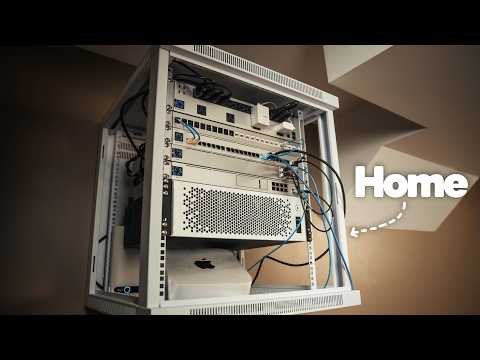
2:22 Yeah. This is the dream machine pro. It's like the brain of the network. Internet comes in and it decides where everything goes. This is the main switch. Everything in the house plugs in here. And a lot of these ports don't just carry internet. They carry power. I got an aggregate switch. You can think of this as the express lane 10 gig for the machines that well they move huge files like the Mac Studio. A lot of the times you have to use these little cables that will allow you to move massive files. And then the patch panel is where every Ethernet cable going around the house finally lands. These are the Wi-Fi points.
3:04 one cable powers them and connects them. And this powers the whole rack right from my phone together. This is where all of it lives. server racks, as you may imagine, because of AI. Well, these have exploded in price. Luckily, my father-in-law had one laying around, and it's been the one I've been using. This however was going to be a test bench for me because really guys, as much as I sound like I know what I'm doing, I kind of don't know what I'm doing. So, I need to test things. Well, I do know what I'm doing now because I learned it all as I went.
3:52 But, yeah, anyone can do this, specifically with products from UniFi, which is like the Apple of servers hardware. Everything online is super well documented and for the most part, it's almost plugandplay. And guys, use AI. Use it to learn. Learn new skills. Learn how these things work. You can literally use AI to kill AI in a way. Technically, this is the easiest part about a server. Just like racking things up. Now, there are so many things I don't know about networking. Like the fact that I'm not sure why this comes like that, but I'm about to find out and I'm going to solve this problem. This is my old patch panel. All those cables in the back go into plugs all around the house. Now, to test what I had just put together on the rack, I needed to find a way to use the patch panel to connect the modem and the rack that were going to be separated by my furnace room. And of course, this is not what I wanted.
4:48 I wanted all these cables to come into the office being separated by that one wall in the furnace room. So, all those cables, well, they needed to be rerouted and I needed a company to help me do so. But before, holy crap, I did not know this could get so heavy, bruh.
5:21 Okay. >> >> And now to feed this with internet, believe it or not, it's actually pretty simple. we need to plug in the cable right here on port 9. So, here's what I'm going to do. I have this massive Ethernet cable. I'm going to plug this one right here on port 9. There you go. And I completely forgot I had another port here, port three, behind my temporary desk. There you go. So, that goes there. That connects to my patch panel at port three. Patch panel port three already has a cable. And that cable is going to go straight to my modem right here. in any of these yellow ports. Bam. There you go. We're connected. See, this literally means that we're getting data right here.
6:31 Cool. And we are ready for a proper setup, which is what I'm going to do with my phone right now. Let's get to it. Remember when I said UniFi is like the Apple of Networking? They really are. They have like a clean app, a super intuitive setup. It takes 2 seconds for your machines to be recognized directly by the app. I love that. Plugging my modem directly into the machine automatically recognizes my internet provider. The only tricky part with this setup is that it may create a doubleNAT.
7:03 Basically, what this means is that my Bell modem and my UniFi router both think they are in charge. So, imagine this. It's like you end up with two front desks trying to sort your internet traffic. Sending stuff out works fine, but anything coming in gets stuck at Belle's desk because Belle doesn't even know that the UniFi site exists. The solution to this took a lot of chat GPT requests, but essentially for Bell, it's called Advanced DMZ. Now, if you live in Canada and your provider is Bell, you're probably going to run into this issue. But this is a networking issue that doesn't really make sense at first because well our router now has a public IP given by Bell or ISP. So that is good. However, we still don't have internet and that is because Bell's advanced DMZ basically gave it an address without pointing it anywhere. So even though Belle gave my router, my new router the right internet address, it forgot to give it the direction towards the internet. And that's what we're going to do right now. We're going to direct it to the internet. I know this sounds so complicated, but really guys, it's not. You think I knew any of this before Chad GPT? Hell no. But that is the beauty of UniFi because fixing it all up within the dashboard takes 2 seconds. There you go. And I'm not going to you guys. I did study computer science. I'm a former software engineer and and I know a lot about development and stuff, but I'm no networking geek. Not at all. And you know what? A lot of this stuff I learned through chat GPT trial and error. And I just figured it all out. And this this is the final moment where you're going to get all of your devices connected to the internet. This, believe it or not, is your new Wi-Fi point. So, that is cool. With a house having multiple Ethernet ports, it was easy for me to take this Wi-Fi point and practically place it anywhere around the house. You can stack these, by the way. And the cool part is that they are PoE. They power with a single Ethernet cable. So it's extremely extremely convenient. For testing purposes, I had to test this in my office. also, these three machines, they connect together, guys, with special connectors. The connectors I showed you guys before that allow you to in theory reach 10 GB Ethernet speeds. This is how they are able to communicate together and orchestrate the entire networking in your house. All good to go, guys. 10 GB Ethernet. And now we're going to take our cable right here, and this is going to connect to our switch right here at the 2.5 GB Ethernet. Bam. And it's going to power up directly. As you guys can see, it's on. This is amazing. This is so cool. I don't need a separate power adapter to power this thing. Then bam, there you go. We adopt it. It's literally this easy with this system. It's incredible.
10:10 It's unbelievable. So really, from here on end, I can connect my wireless devices literally to this Wi-Fi point. And I can have one Wi-Fi point in the basement, one Wi-Fi point in the main floor, and then one Wi-Fi point on the second floor. Crazy, right? Oh yeah, morning guys. Look at this. This is my server rack from UniFi. And this is also my future home Linux server. This is just a case though. Let's see.
10:42 Really, I can't believe I'm finally doing this thing for the house. I am so freaking excited. This is like I've been really looking forward to this. Yo, getting this rack took quite a few weeks cuz well, yeah, everyone is buying racks now. Look at this beauty. Wow. Okay, this is really nice and white. Wow. And it's got a glass panel right there. I don't know if you guys can tell. And then our survey case. And now, ladies and gentlemen, I'm going to use my technician to help me mount this thing.
11:13 Novate. Shout out to them. I think I found my forever electrician. Man, was this guy good. He was here because remember when I told you I needed to move all this from the furnace room, then route it through this wall and have the rack sit exactly where I want it in the office. He was exactly here for that. He was here to help me mount this entire server rack and pass those cables straight into it. But the main reason as to why I knew I wouldn't be able to do this by myself without breaking my head was terminating cables. Terminating cables, guys, is a whole art. Terminating means putting a connector on the end of a bare Ethernet cable. And since the old patch panel was obsolete because we had rerouted the cables into my office room, we needed to punch new keystone jacks into every single cable in order to fit it within UniFi's patch panel that I had bought because well that entire thing was practically going to sit within the server rack and a proper a proper server rack mounted on a wall. A little tip, by the way, get yourself a company that will test your connections. Testing connections means that they test every single Ethernet port. They make sure it works and can deliver 10 GB Ethernet speeds if needed. 10 GB Ethernet speeds is important when transferring massive files within your network. But beware, not all devices support 10 GB Ethernet.
12:55 Some support 2.5, others one. But Mac Studio, it actually supports 10. And the Mac Mini as well. The new Mac Mini. >> Bro, I don't know what the hell this guy did, but we got crazy internet speeds. yes, he did change the fiber optic cable. he got a better fiber optic. Like, he paid a lot of money for it. So, well, I paid a lot of money for it, I guess, cuz I'm getting invoiced. Last thing to do is to take my whole thing and just, I guess, reroute everything here. And then I have to order the parts for this server setup that I'm going to build. So that's cool. This guys, this is going to be part of a whole desk setup makeover episode. I promise you.
13:37 And this, I guess, is just the start. This looks really freaking cool. >> >> Oh, okay.
14:14 Left. You see, at home, at home, I'm not going to be doing this. I'm not going to be buying a bunch of HDDs for storage. No, I'm going to be using NVMEs. And the reason is because well, I don't have that much to store like I do at the studio. So, I don't necessarily need a whole server rack with a bunch of HDDs.
14:49 My Linux server, the only thing it needs are NVME. This is exactly what my motherboard is going to be powered with. This is an old motherboard that I I stored with a CPU. It's actually not that old. Never mind what I just said. Old sounds insane because this is a 7950X 3D CPU. but this was my old CPU before I like upgraded my PC and so on like 2 3 years ago, whenever that was. but yeah, I'm going to be recycling this. I believe in total I have three slots for NVMEs. So, that's going to be awesome. It'll be plenty for us. And then I'm going to put two sticks right here of RAM. And that'll be plenty. I think these are 32 GB kits. So, that's awesome. Here is the most important piece in this puzzle to get the Mac Studio to work properly. This computer I'm building is basically a computer that never turns off. The point is to sit in the rack quietly and your phone, your laptop, and your TV can all reach it whenever they need something. We already have one of these at the studio, but that one solves a completely different problem. So, what is this thing actually going to do for me?
16:06 Right now, my photos live in someone else's cloud. My smartome runs through someone else's servers, and I pay monthly for a lot of it. The idea is to bring that home. Use this computer to run image, home assistant, and casable. And this is basically a normal PC build just inside a server case. And for a server, that means Linux. Here's why. Linux. Linux can run with no screen at all. It's free. It's light. And it's designed to run for months without needing a restart. For a machine that never turns off, that's actually what you want. It's using Ubuntu server. It's one of the most popular versions of Linux, which also means that whenever it gets stuck, someone online has already been stuck in the same place. And this is the part that throws people off. There's no desktop, no wallpapers, no icons, just text. But building a server, guys, it's one thing. And maintaining it is a complete different problem because eventually you've got storage, Docker containers, permissions, networking, backups, and a bunch of things you really don't want to find out are broken after you start messing with the server. So on on on this server, okay, I started building this internal tool called Anke pre-flight and and the idea is pretty simple when you think about it. Before I make any major changes to the server, I run one command and it audits everything for me. And I've been building it with the help of Devon. And Devon, well, Devon allows me to pretty much avoid building new features myself. like I've started treating my backlog like work at hand off to another engineer. Except in this case, that engineer well is Devon. Devon is an autonomous AI software engineer from Cognition. And what I like about it is that I'm not treating it like another chatbot that I have to sit there and constantly prompt. I'm treating Devon more like a teammate. And he actually helped me at the beginning build this whole thing from scratch. you know, installing image and home assistant all together at the same time. But now, if I want pre-flight to check the health of every Docker container running on my server, well, guess what? I've already written out exactly what I need as a real GitHub issue. So, I'm just going to hand that over to Devon. And Devon gets its own computing environment with a browser editor and shell. so it can inspect the existing codebase, make changes, run tests, and actually work through the problem. But here's where it gets interesting. I don't need to wait for it. I also want pre-flight to check my storage. I recently added another M.2 to this. So, I want to know if something isn't mounted correctly or if one of my storage modules is getting dangerously full. So, if I give that to another Devon session, I've got another issue in the backlog that needs tests. So now I've got three pieces of real engineering work happening in parallel.
19:13 And instead of sitting here watching them work, I can just like go work on something else. And that's really the part that interests me. I'm still deciding what gets built. I'm still reviewing the work. I'm still responsible for what actually gets merged, but I don't necessarily have to personally work through every single issue anymore. I can hand Devon a real task in an existing codebase, let it work through it, and come back later to review what it actually did. So, while I'm physically building out the home lab, Devon is working through the software backlog behind it. And for someone who actually became the IT department of his own house, that's pretty useful. If you guys want to check Deon out, I will leave a link to him below.
20:00 >> >> So, I brought this to the office here at the house because, this is a PC that was living in our other room, if you guys recall that video. And I think I'm going to use this PC along the server to kind of just have a workplace. Now the big question is is it going to work with the XDR display because the Mac Studio well is going to be the AI agent for the house. So it's probably going to live somewhere in there along with this our Linux server. Now this office in here guys work in progress separate episode. You guys know how it goes. That setup makeover episode whatever we're at. I'm going to start by setting this whole thing up first, then connect that into my UniFi rack and then try to use my Windows PC. The only thing that annoys me about having my desk set up here is that well, my Ethernet ports are right here. And I have another one at the bottom there. So, that's annoying.
21:08 Normally, when I get a new Mac, I'll just like transfer everything from one Mac to another. this time, man, quite different. I I'm starting from scratch actually. You see, I might get even more creative with time and I might just download Open Claw and Hermes. I'm like, you know what? Let me just set this up without my accounts. I want this to be a machine just for one job and that's agent. And the beauty about the Max Studio is not only its powerful GPU, but it's also its 10 gigabit Ethernet port that will go right into my aggregation switch. And just like that, boom, the Mac and the Linux server can communicate on the same highway, provided you update your networking card on your server to a 10 GB one. with this, I needed this Mac Studio to basically run 24/7. And because it was going to live on a rack, I needed remote control. Basically, the ability to remote connect from anywhere in the house. I also needed this to boot up itself in case of a power failure and log into the account automatically to kick off services. Also, never update itself unless I say so. And never sleep.
22:28 Unless I say so. And once that was configured, this thing was ready for one actual job. And here's the simplest of ways of explaining that job. When you use an AI chatbot, right, like chat GBT, your question leaves your house. It goes to Open AI's data center and the answer comes back to you. But I I got this Mac Studio to basically avoid that and own my own data. And an app called LMS Studio is the app that lets you do that. It's the app that lets you download a local AI model, basically the brain file, and it lets you run your own little data center in the computer. And I started with Gemma. It's small and I just wanted to make sure the whole thing worked. I unplugged the internet and bam, it was it was working. Once I knew my data was being processed for sure by my Mac Studio, not by any data center out there, I moved on to something a lot more capable. You see, this has an M5 Ultra 36 core CPU and 80 core GPU along with 256 GB of unified memory. So, it is capable of running some serious AI brains. I ran Alibaba's Quinn 3.8, ate the 27 billion model parameter. I also gave this Mac a a permanent address through UniFi. I turned Element Studio into a server with a simple click so other devices can ask it question. Duh.
24:03 And locked it down so only my devices can use it. With the help of a special password called a token, I can have my Linux server communicate with my Mac Studio and have both of these computers behave like one system. The Linux server doesn't need to run the AI itself. It just needs to know where the Mac Studio is and have permission to talk to it. So, when the Linux server asks what AI models are available, the Max Studio just simply answers. By the way, I'm probably making this sound like it was super easy, and it is, but you know, sometimes it requires some troubleshooting skills. You you at least need that.
24:49 Okay, question for for you guys. I know what the hell you're doing. Listen, how do I explain this? Turns out that my Ethernet speeds were getting overwhelmed. So, it would make my SSH session freeze and then I would have to restart the network in Carbia Linux and that that would happen every time I would start my Docker open web UI image. I don't know why, but the solution was pretty simple. Now, you let me know if this makes sense. So, because this bad boy is running a 2.5 GB Ethernet networking card, I connected that to my aggregation switch, which runs at 10 GB Ethernet. I think maybe there was some sort of miscommunication between this adapter and my RJ45. So, what I decided to do was I went to the switch and now I'm running at 2.5. Now, I did order a 10 GB Ethernet networking card. I'm going to install on the Linux server because that's what I did at the office. I feel like this should fix that issue. Then I'm going to be able to connect this back to my aggregation switch. Does that make sense? Is that is that the is that the reason as to why my thing kept like bottlenecking? If what I just said doesn't make sense, please let me know.
26:07 But hey, I'm going to try that and it should be fine. Anyways, that allowed me to run my model running on the Mac Studio directly on my Linux server. And this was possible through an app I installed on the server called Open Web UI, an app you can access through your browser URL. It runs on your local network because again, the whole point of the Linux server is to deliver local network apps for your house. But essentially, this app allows me to load Quen from the Mac Studio and basically tailor it to my own needs.
26:40 This is where you start going into the whole rabbit hole AI model training type of stuff really. And then came what I really wanted all along. Connect my office server to my home server and have the Mac Studio act as our company AI provider. Well, I'm actually cap. Great. That's That's just amazing. so apparently >> my cap is 3 GBs per second with my internet provider because of the area I live in. Fine. And it's the same thing with the office. So, I can only go up to three. I just called them.
27:18 They're like, >> "Listen, sir, we can upgrade your internet speed from 1.5 to three." I'm >> amazing. That's still really good. I'm not complaining in that matter, but I am complaining about the fact that I can't get it to like six or eight or 10 because then what I would do is that I would connect the office to the house in one connection via a VPA VPN tunnel and then get 10 GBs everywhere. Can't do that. I'm capped. Great. Now, it doesn't really change that much for us. Like, it doesn't change much for like the cameras or like, you know, me opening the house, for example. In the automation world, at 3 Gbits per second, we're pretty covered. I'm not worried about that. What I am worried about is transferring footage from the house to the studio. Like the footage that comes out of this camera is is like extremely heavy, especially with the production we kind of do. So, I guess it's to be tested. I got to test that.
28:12 There's no other choice. They did tell me they were going to send me another modem in order to achieve those 3 GB speeds. Anyways, doesn't seem to end. Aside from my Mac server taking care of my Mac Studio, my wife and I will use it as a Google Photos alternative, also as our automation hub for the house and eventually practically have the Mac Studio along the Linux server, control all the software I need to run the business via Automation Watchers. By the way, I like using a tool called Parseek to log into any machine and remote control them. An Android phone is actually capable of remote controlling your Mac via Parseek. That's in case you ever need to, but that is the app I will be using with the help of my Windows PC to make sure all is well on that computer. Cuz at the end of the day, this Mac Studio really is built for AI compute performance in demanding workflows like running large language models. Those are Apple's words. When you choose this 36 core CPU and 80 core GPU, this is this is crazy. I have so many more videos to come because really this whole entire server will control my house and my security. I'm going to build a crazy security system with all of it.
29:47 Who would have thought that you could pay four, five, 8, $10,000 for a computer to literally leave it like this within a server rack. That to me is insane. What's crazier though to me is that I have my own private local AI running at the house. But I think what's even crazier is that this private AI also runs on my phone. Like I can access this on my phone. And what I mean this is I can access the Mac Studio on my phone and access its GPU capabilities to deliver chat GPT like answers type of thing. And the truth is that guys, the stronger these these Apple Silicon Mac studios get, the better the AI experience for us, especially for the house. This is what I've been telling you guys. Yo, learn about servers, learn about computers, because you can literally take something like this, implement it in your home, and avoid using Chad GBT and selling your data to the big big company.
30:50 especially when you don't know what you're doing. Cuz I feel like when you know what you're kind of doing, it's a lot easier to protect yourself. This This to me is like the salvation. So, this guys, this is literally episode one of what I'm going to be doing with my house. Stay tuned, guys, because I'm going to be building this thing even further. Building this whole entire space even further, putting cameras everywhere around the house, and I'll make it super easier to the point that you guys can replicate the entire thing. If you guys enjoyed this video, don't forget to subscribe, like it, and to the guy that really put me on UniFi, this is this is all because of you, man. Thank you.
Summary
- The creator thanks Devon for sponsoring the video and emphasizes the role of AI in modern computing.
- A home server rack is introduced as a solution for managing data and enhancing home automation.
- The creator shares their experience of setting up networking gear, including switches and access points, to improve internet connectivity.
- They discuss the challenges of networking, including issues with double NAT and the importance of proper configuration.
- The video highlights the use of AI tools, specifically Devon, to assist in software development and server management.
- The creator plans to use their server for personal data management, home automation, and as a local AI model provider.
- They emphasize the benefits of using Linux for server operations and the significance of high-speed Ethernet connections for efficient data transfer.
- The creator expresses excitement about future developments, including building a security system and expanding their home automation setup.
Questions Answered
How is AI influencing home computing and networking setups?
The speaker discusses the impact of AI on Apple's product development, emphasizing that AI is reshaping the way computers are built and used, particularly in home environments. They share their personal experience of setting up a home server rack and the challenges of managing home networking.
What are the steps to properly set up a home network with UniFi?
The speaker explains the process of connecting their modem to a UniFi router, highlighting the ease of setup with the UniFi app. They also discuss potential networking issues like double NAT and how to resolve them using Advanced DMZ settings.
Why is Ethernet speed important for home networking?
The speaker emphasizes the significance of 10 GB Ethernet speeds for transferring large files within a network. They note that not all devices support these speeds and share their experience with upgrading networking components to enhance performance.
How can one manage multiple IT tasks effectively at home?
The speaker describes how they can delegate tasks to an AI assistant while managing their home IT setup. They highlight the benefits of being able to oversee multiple engineering tasks without needing to handle every detail personally.
What steps can be taken to optimize home network performance?
The speaker discusses troubleshooting network issues related to Ethernet connections and the importance of using compatible networking cards. They also mention using applications to enhance server capabilities and connect different systems.